


Welcome To Wa Sender: Our digital tools for technical marketing allow you to easily create and send personalized messages directly from your PC. With efficient group contact management, you can gather all members of a Bulk Sender group and reach out to them seamlessly. Access detailed reports to monitor your campaign’s performance and optimize your strategies. Additionally, our multi-account functionality enables you to send messages from various Bulk Sender accounts across different channels automatically, ensuring a smooth and effective communication process.
- 🖼️ Image: Software supports multiple images with captions, which can be sent to all imported numbers with a single click.
- 📄 PDF: Bulk Sender is a great tool for sharing PDFs with multiple users. It’s the best way to convey information with an unlimited number of characters.
- 🎵 Audio: Supports not only text but also various media files. Marketing through audio on mobile is essential for every sector nowadays.
- 💬 Send Customized Messages: Create and send personalized messages (including recipient names or other variables) directly from your PC.
- 📇 Import Contacts: Import contacts manually or from a file (CSV or TXT).
- 📱 Send Without Saving Contact: Send Bulk Sender messages to contacts even if they are not saved in your address book.
- 🔄 Multi Account: Automatically send messages from different Bulk Sender accounts across multiple channels.
- 🔀 Create Multiple Variations: Automatically create multiple variations of messages to send to all contacts, helping to avoid spam or bans.
- 📊 Get Report: Access detailed reports of your campaigns in the LOG section.
- ⏰ Message Schedule: Schedule messages and set delays between sending to avoid being banned.
- 👥 Group Messaging: Gather all members of a Bulk Sender group to contact them via Bulk Sender.
- 📉 Numbers Filter Feature: Bulk check of Bulk Sender and non-Bulk Sender phone numbers.
- 🔄 Multi Account: Multi Account (Multi Channel) to automatically send messages from different Bulk Sender accounts.
Packages & Pricing
 Starter
For getting started
Starter
For getting started
- 1.000+ Premium Backlinks
- SEO For 3 Keywords & 1 URL
- Quality Mixed Backlinks From Articles, Comments, Forum Profiles, Bookmarks, etc
- Mixed Do-Follow, No-Follow Backlinks
Premium Wiki Backlinks (mix profiles & articles)- Social networks & Forum profiles
- Blog/image/comments backlinks
- Authority Profile Links
- Full Report within 15 Working Days
- 100% Safe With Search Engines – White Hat SEO
Super Fast Index ProcessSubmit to over 1000 Search Engines
Pro
Best for most users- 5.000+ Premium Backlinks
- SEO For 3 Keywords & 1 URL
- Quality Mixed Backlinks From Articles, Comments, Forum Profiles, Bookmarks, etc
- Mixed Do-Follow, No-Follow Backlinks
- Premium Wiki Backlinks (mix profiles & articles)
- Social networks & Forum profiles
- Blog/image/comments backlinks
- Authority Profile Links
- Full Report within 20 Working Days
- 100% Safe With Search Engines – White Hat SEO
Super Fast Index ProcessSubmit to over 1000 Search Engines
Elite
For enterprises
- 10.000+ Premium Backlinks
- SEO For 3 Keywords & 1 URL
- Quality Mixed Backlinks From Articles, Comments, Forum Profiles, Bookmarks, etc
- Mixed Do-Follow, No-Follow Backlinks
- Premium Wiki Backlinks (mix profiles & articles)
- Social Bookmarks and Blog Comments
- Blog/image/comments backlinks
- Authority Profile Links
- Full Report within 30 Working Days
- 100% Safe With Search Engines – White Hat SEO
- Super Fast Index Process
- Submit to over 1000 Search Engines
Unlock the true potential of your business communications with our cutting-edge Bulk Sender platform. Our mission is to revolutionize the way you connect with your audience by automating the process of sending bulk messages in the most effective manner possible. Imagine reaching thousands of potential customers with just a few clicks, all from the comfort of your PC.
🌟 Efficiency Redefined: Say goodbye to the tedious manual messaging processes. Our automated system ensures that your messages are sent quickly and accurately, saving you valuable time and resources. This streamlined approach allows you to focus on what matters most – growing your business.
📈 Proven Success: Did you know that 68% of Bulk Sender users find it the easiest way to connect with businesses? This isn’t just a statistic; it’s a testament to the power of Bulk Sender in driving customer engagement and boosting sales. Join the growing number of businesses that are leveraging this tool to stay ahead of the competition.
💬 Seamless Integration: Our platform is designed with user-friendliness in mind. Whether you’re tech-savvy or just starting out, you can effortlessly send Whatsender messages directly from your PC. The intuitive interface ensures that your campaigns are launched with ease, making complex marketing strategies accessible to everyone.
🚀 Impactful Marketing: Engage your audience with personalized messages that resonate. Bulk Sender allows you to tailor your communication to fit the unique preferences of each recipient, enhancing the effectiveness of your outreach. From promotions to updates, every message can be crafted to drive action and foster loyalty.
🌐 Expand Your Reach: Tap into new markets and demographics with our versatile messaging solutions. Bulk Sender supports a variety of media formats, ensuring that your message is delivered in the most engaging way possible. Whether it’s images, PDFs, or audio files, your content will captivate and convert.
🔧 Innovative Features: Our platform goes beyond basic messaging. Enjoy advanced features such as detailed campaign reports, multiple account management, contact importing, and message scheduling. Each tool is designed to enhance your marketing strategy and provide you with the insights needed to refine your approach.
Embrace the future of business communication with Bulk Sender. Transform the way you connect, communicate, and convert. More business is just a message away.
🖥️ Sociabo WhatsApp Marketing is an application designed to send bulk WhatsApp messages directly from a PC in a simple and efficient manner.
Download and install Eho WhatsApp Marketing from the following link:

Important: This tool allows you to communicate effectively with recipients who expect to receive your messages (e.g., clients, students, patients, members, subscribers, etc.), and it is not a spam tool. Therefore, we are not responsible if you have been banned due to sending a large number of messages to contacts who report you as a spammer because they are not subscribed to your newsletters or not interested in your messages.
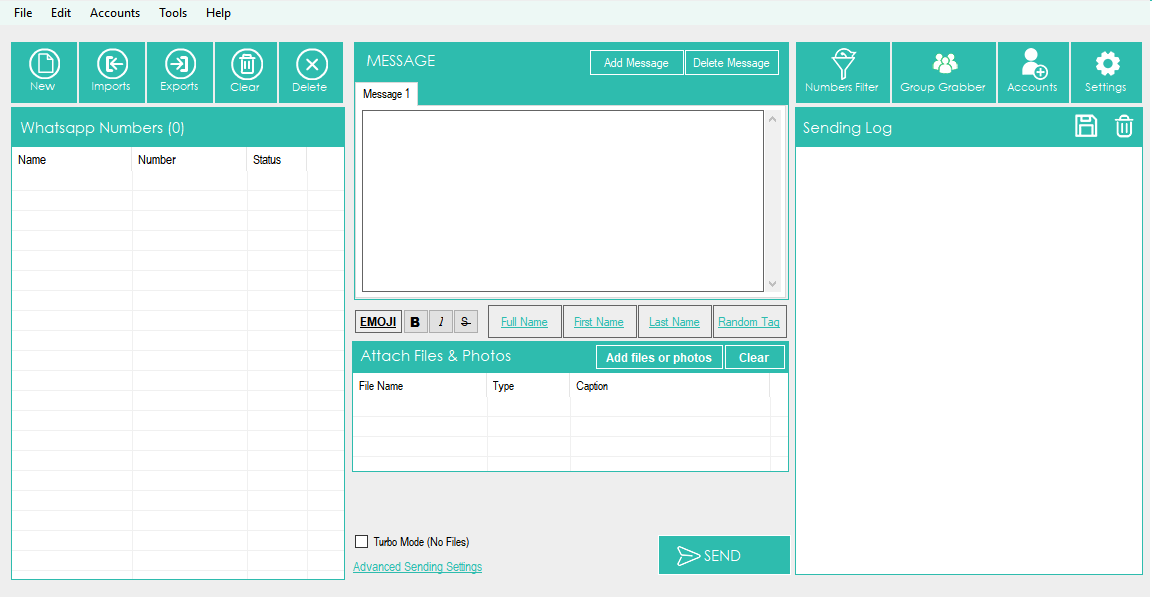
🔧 Immediately after installation, you will see the following main screen:
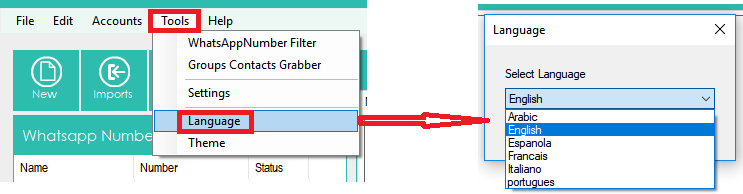
🔧 Select the desired language (Arabic, English, Spanish, French, Portuguese, Italian) by clicking on the Tools menu and then Language, as illustrated in the image below:
HOW TO SEND BULK WHATSAPP MESSAGES FROM A PC
STEP 1. Import or add your contacts
🔧 Click on IMPORT at the top left to import all your contacts (recipients of the message you want to send). You have two ways to add your contacts (import from a file or manual import)
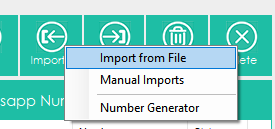
💡 If you click on “import from file,” it will open a new window where you can select and import contacts from the CSV or TXT file. In these files, you can have a column with the phone number or two columns with the name and number (e.g., Name, Number). You can also have more detail with the name, number, and other variables.
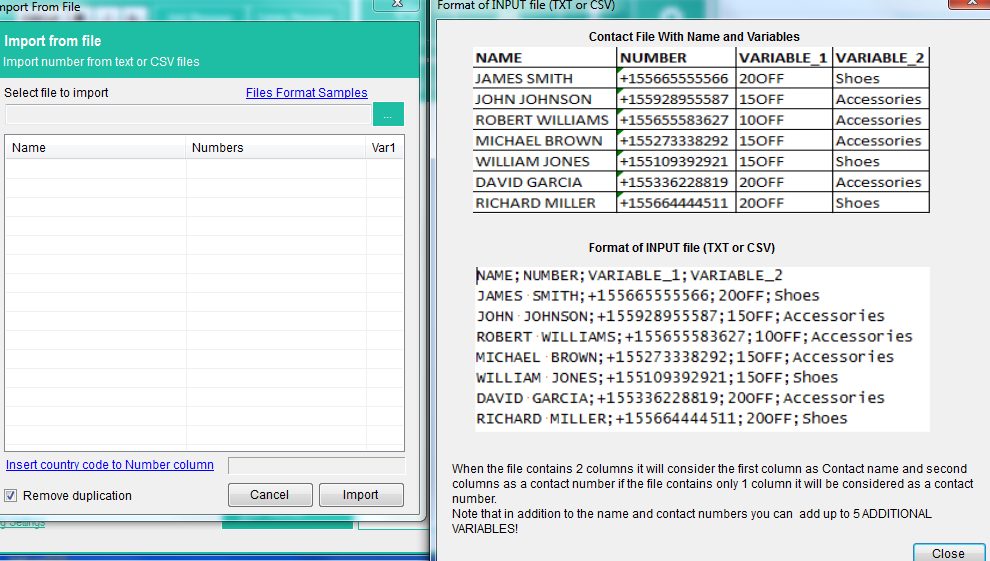
💡 If you import contacts with the name, numbers, and variables, you will be able to create customized messages with “parts of the message” taken automatically from the imported file.
💡 If you want to import a file with multiple variables, here is an example of the format of the txt or CSV file to use:
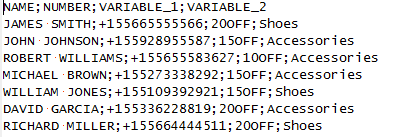
As you can see, all fields must be separated by “;”
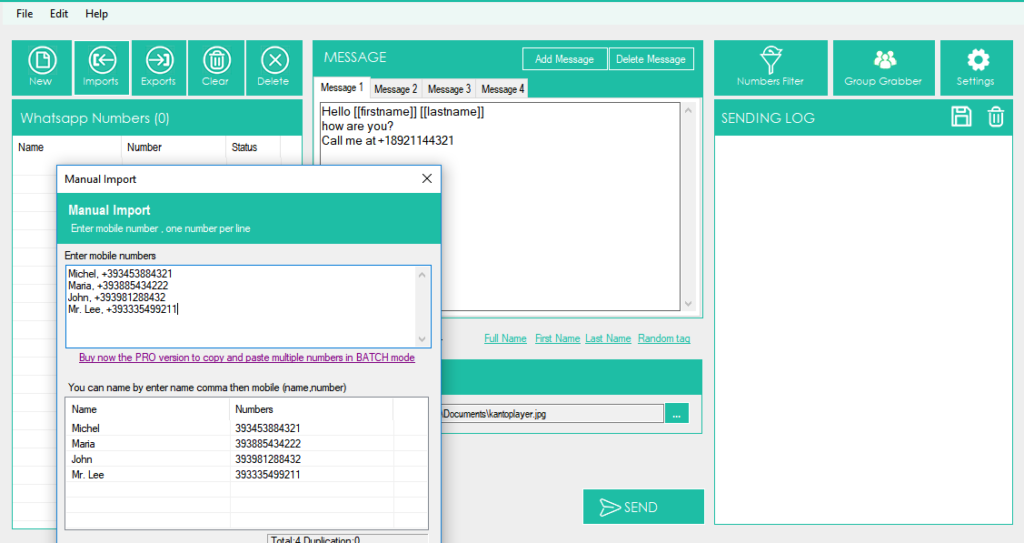
💡 If you click on manual import, it will open a window where you can manually add your contacts and enter the name and mobile phone number (or mobile numbers only).
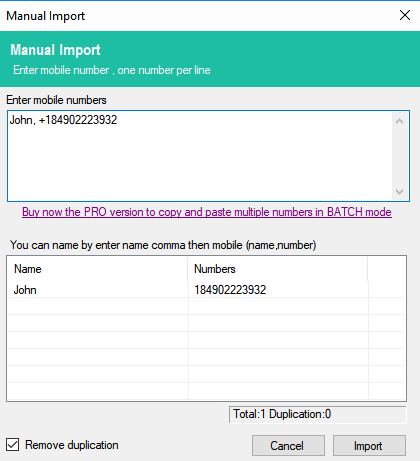
Once you add contacts, click on IMPORT.
STEP 2. Create the message to send
🔧 Now, you can start typing the message to send to your contacts (from the program’s central section).
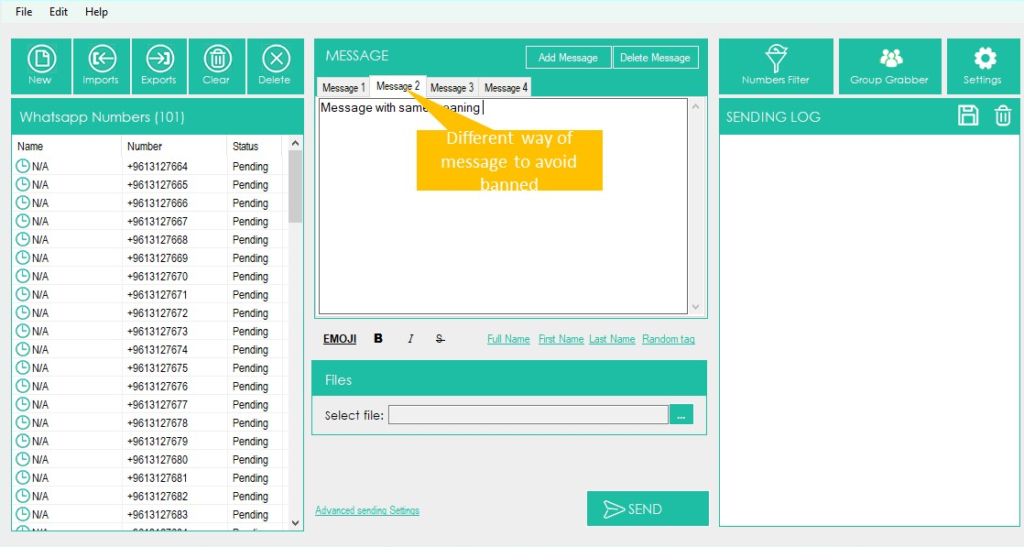
🔧 You will also be able to create different “variants” of the message so that your contacts do not receive the same text (this avoids spam and prevents being banned on WhatsApp). Just click on the “add message” button to create a new version for the message.
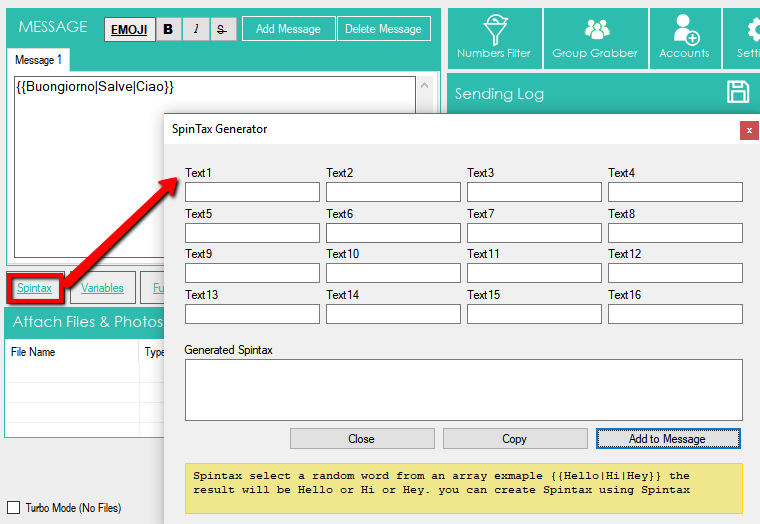
🔧 There is also a link “SpinTax”: it will allow you to define a word array with the same meaning or synonyms (e.g., Hello, Hi, Hey) and when you send the message, the program will use them randomly. This way, you will automatically send different messages and reduce the risk of being “banned.”
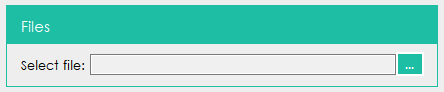
🔧 You can also select a file to attach (photo, images, documents, or video file) and send it with the message.
🔧 You can also select a file to attach (photo, images, documents, or video file) and send it with the message.
STEP 3. Send the message
When all contacts are loaded and the message is ready, simply click the Send button below.
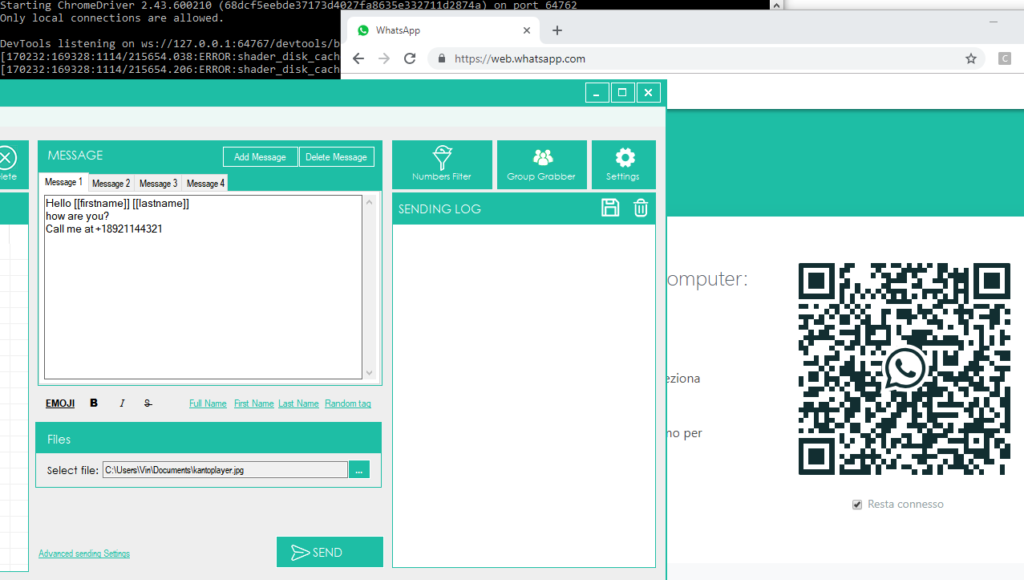
🔧 After clicking the send button, it will open this window:
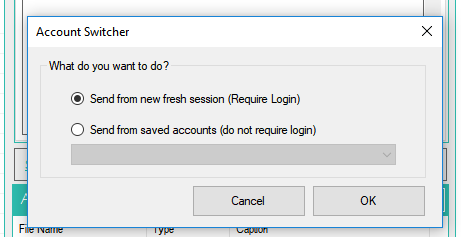
► You can send from a fresh new session (after logging in), send from a registered WhatsApp account (do not require login), or send messages in rotation using all WhatsApp accounts stored in the program.
► You can add multiple WhatsApp accounts by clicking on ACCOUNT (in the top menu bar)
After choosing the account and sending mode, Sociabo WhatsApp Marketing will automatically open web.whatsapp.com on Google Chrome, and you will see a QR code. Scan this QR code with the scanner in WhatsApp. To do this, open WhatsApp on your phone and:
► On Android: in the chats screen > menu > WhatsApp Web.
► On iPhone: go to settings > WhatsApp Web.
► On Windows Phone: go to the menu > WhatsApp Web
Then, scan the QR code on your computer screen from your phone. Shortly after, the WhatsApp message will be sent to all recipients!
Other functions/settings
Sociabo WhatsApp has a very simple and intuitive user interface where all tools are at your fingertips:
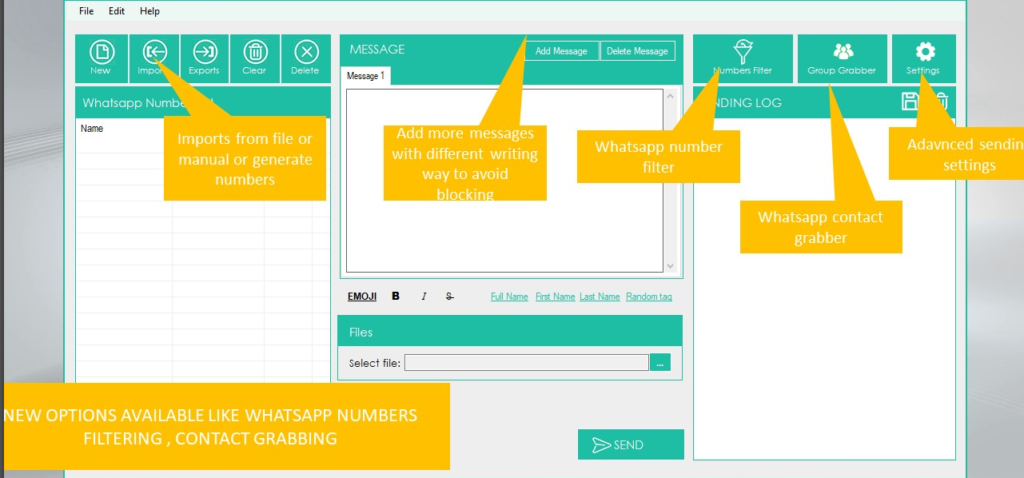
💡 In addition to the already discussed basic functions such as importing contacts and creating a custom message, there are other interesting advanced features and settings in the program.
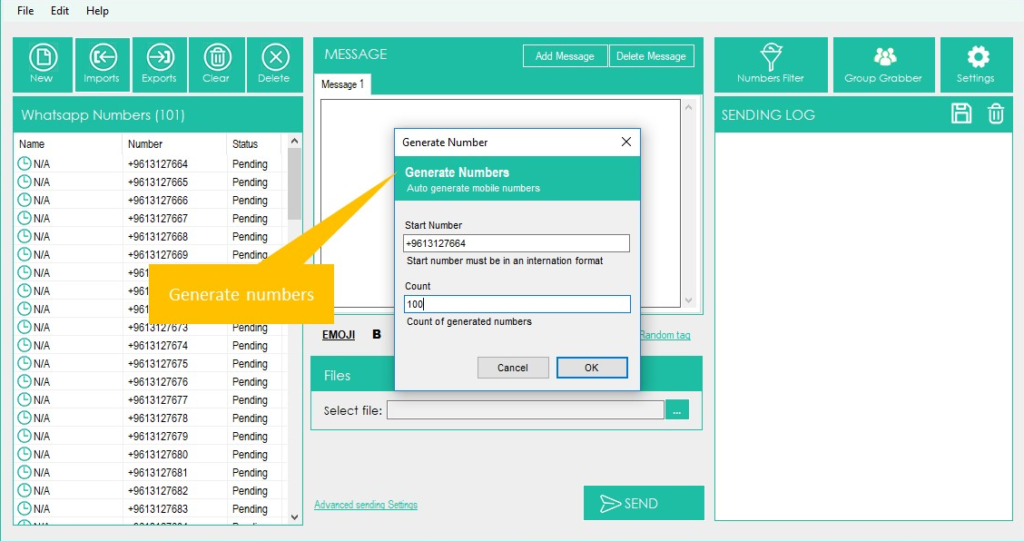
GENERATE numbers: If you click on imports-> generate numbers, you will be able to create mobile numbers to try to reach. You will need to set a “starting number” and a “count”: the program will generate all numbers as you can see from the image below.
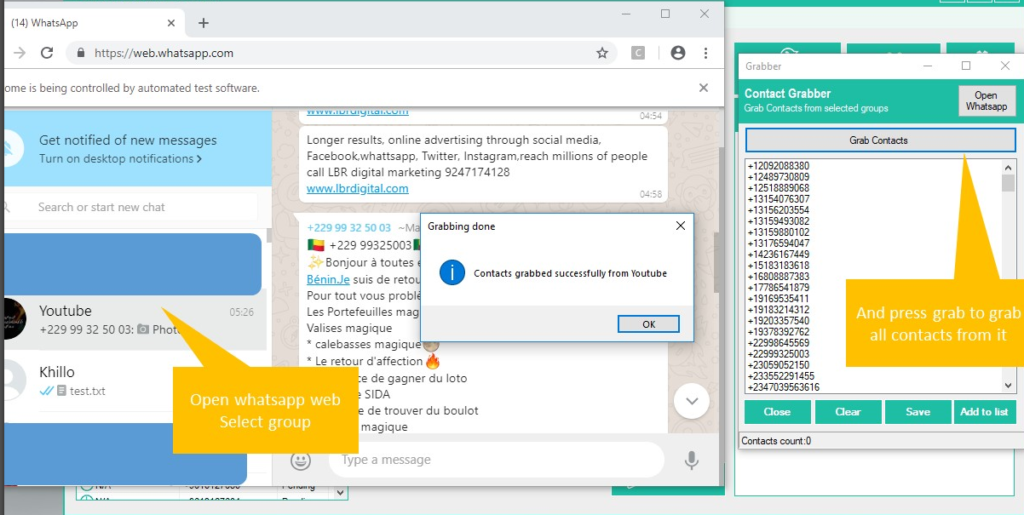
CONTACT GRABBER: This function will allow you to grab all contacts from a selected WhatsApp group. Simply open WhatsApp, scan the QR code from your phone, select the group, and Eho WhatsApp Marketing will extract all contacts. All contacts will be listed on the “contact grabber” window as you can see from the image below.
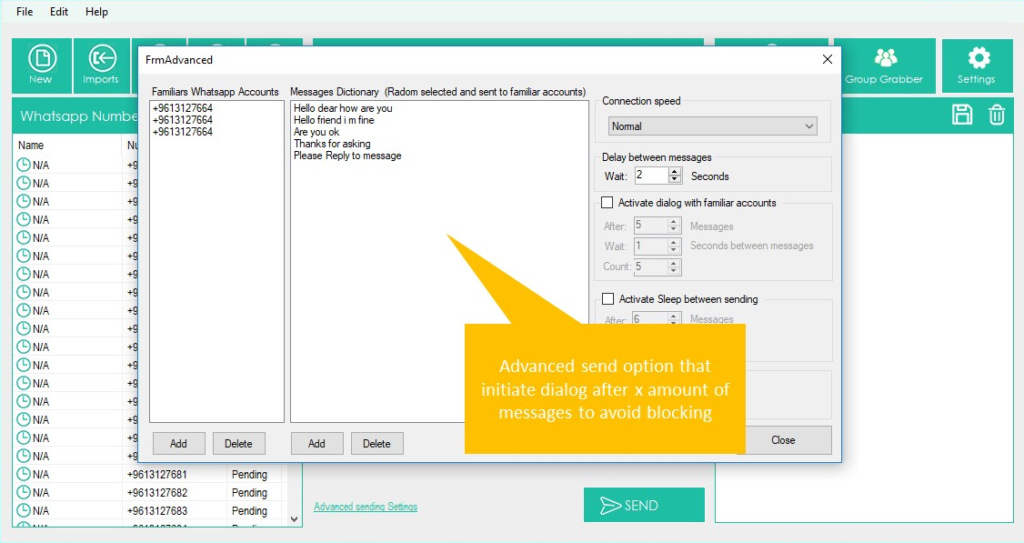
SETTINGS: If you click on “advanced sending settings” on the “settings” button, it will open a window where you will find the advanced sending option that initiates the dialog box after “x” quantity of messages to avoid blocking. You just have to set your familiar WhatsApp accounts and a message dictionary (random message that will be sent to your familiar accounts).
NUMBERS FILTER: This feature will allow you to know, given a list of phone numbers, which ones are associated with a WhatsApp account and which ones are not WhatsApp. Once the function is opened, you must load all phone numbers (or use the number generation function), then click Start filtering
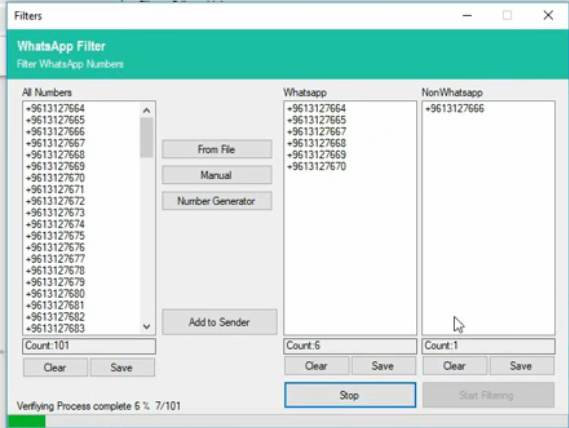
💡 The software will check all numbers to see who are “WhatsApp” and “Non-WhatsApp” accounts.
VIDEO TUTORIAL
Other tips:
If you are using Eho WhatsApp by yourself without intervention by our technicians to send a large number of messages and want to protect your WhatsApp account, we give the following advice:
FAQ – ISSUES, ERRORS AND INFO
📧 BUSINESS BULK SENDER
🖥️ Recommended OS: Windows 10 & 11 (Windows 10 Preferred)
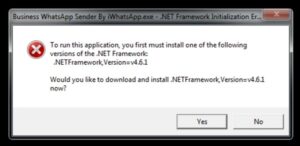
ERROR 1: FRAMEWORK INITIALIZATION ERROR
🛠️ If you’re encountering this error, it may indicate a framework initialization issue. Reach out to our support team for assistance in resolving this issue promptly.
🚫 Error Snapshot:
ERROR 1 SOLUTION:
❌ Encountering an Error?
Here’s the fix:
1. Download the .NET Framework Supportive File: [Download File Here]
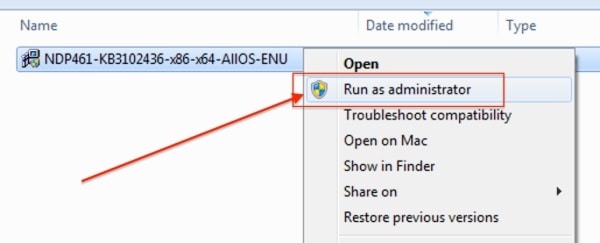
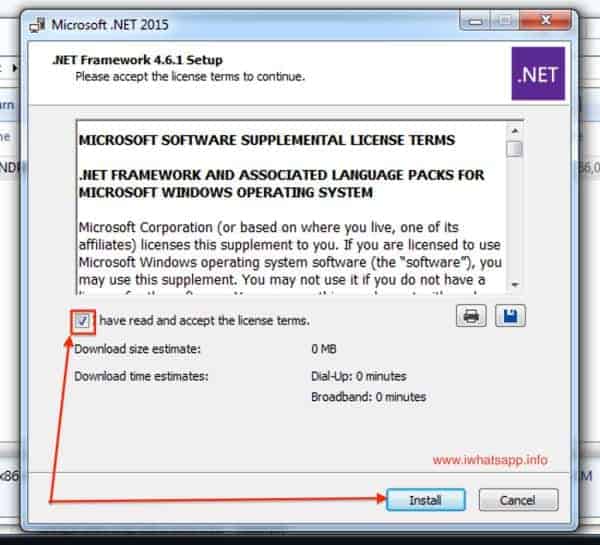
2. Install with Admin Right: After downloading the file, right-click on it and select “Run As Administrator”
💡 Following these steps should resolve the issue and get your system running smoothly
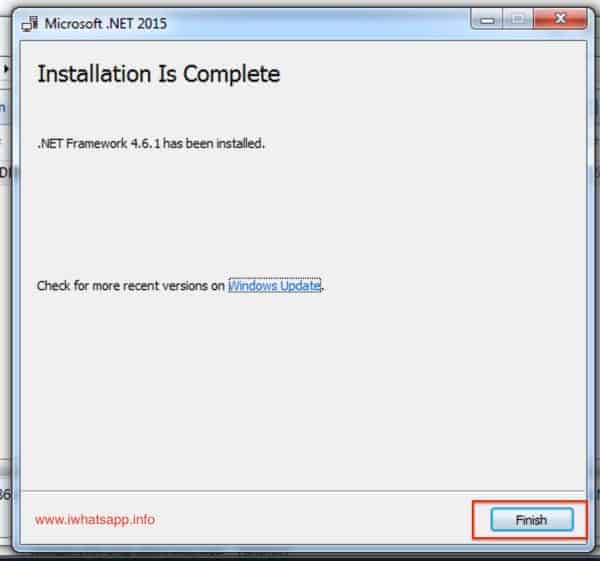
📧 BUSINESS BULK SENDER
🔧 Post-.NET Framework Installation:
After successfully installing the .NET Framework file, proceed to install Bulk Sender on your system.
ERROR 2: CefSharp.Core
🚫 Error Snapshot:
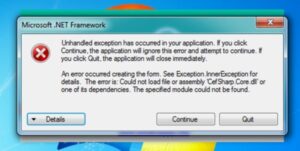
🛠️ If you encounter this error, it may relate to CefSharp.Core. Reach out to our support team for prompt assistance in resolving this issue and getting your Bulk Sender up and running smoothly.
ERROR 2 SOLUTION:
After successfully installing the supportive file from here, restart your computer. You should now be able to open and use Bulk Sender on your PC.
STILL EXPERIENCING ISSUES? WE RECOMMEND >> WINDOWS 10 << INSTEAD OF THE OUTDATED “WINDOWS 7” 🖥️ HOW TO SEND BULK MESSAGES?
► Ensure to add the country code (without +) when importing numbers.
► Add “212” is Country indicatif at the beginning of every number in your data. For example, if your number is 9825098250, then add 2129825098250.
► This software is international, so remember to include the international code at the beginning of every number. 📲
MESSAGES NOT SENDING? HERE ARE SOME SOLUTIONS:
► If your attachment is not sending with the text, try restarting the software. 🔄
►Alternatively, add your message in the Caption Of the Image file: Image -> Right Click -> Set Caption. Remove all messages from the Top Message Section. 📸
►Avoid special characters in your message like [$, <, =, etc]. ❌
►Initially, try sending without including names. Then, import the correct CSV-MS Doc Format with names to send with names. 📝
► If you encounter an "Unable to Load Latest API" error, ensure your internet connection is stable and then reopen the app. 🌐
If issues persist, follow these steps:
1. Ensure you select Blind mode when sending. Safe mode is for saved contacts only. 🕶️
2. Confirm that your Bulk Sender on mobile is active and working well. 📱
3. Check that our software is connected to your mobile Bulk Sender account. 🔗
Adjust the following settings in Bulk Sender software:
►Go to Settings -> Sending Settings -> Connection Speed -> Select SLOW option. 🐌
►In Sending Settings, adjust “Delay Between Messages” to wait between 4 to 8 Seconds. ⏱️
►After making these changes, restart your PC, open the software, connect your Bulk Sender account, and start using it. 🔄
MESSAGES NOT GOING TO UNSAVED CONTACTS?
Ensure you select Blind Mode when clicking the Send button. 🚫
ANTI-BAN TIPS:
► Bulk Sender is designed for legitimate communication, not spamming. However, to minimize the risk of being banned:
– Consider using a new account number instead of your main personal account. 🆕
– Start with small bulks when using a new account. 🔍
– Join open Bulk Sender groups and engage in conversations. 💬
– Write messages in a way that recipients won’t report as spam. 📝
– Use Multi Message and/or Spintax options to vary your message. 🔄
– Establish credibility by joining groups and sending messages only to opt-in users. 🌐
– Avoid sending more than 600 messages per hour. 🕒
– Use Flight Mode for 10 seconds to change your mobile IP dynamically if necessary. ✈️
ADDITIONAL SUPPORT:
► If you encounter other issues such as Google Chrome errors or difficulties importing CSV files, refer to the comprehensive troubleshooting guide provided.
For further assistance, feel free to contact our support team. We’re here to help you make the most of Bulk Sender. 🛠️